

Long Range
Long Range
Interference-resistant
FHSS 2.4GHz wireless
Interference-resistant
FHSS 2.4GHz wireless


Zero-Delay
Zero-Delay
1:1 Communication
between handset and motor
1:1 Communication
between handset and motor


WiFi CAMERA CONTROL
WiFi CAMERA CONTROL
Control Sony, RED,
and ARRI camera
settings on CTRL.5
Control Sony, RED,
and ARRI camera
settings on CTRL.5


Daisy Chain Motors
Daisy Chain Motors
Cleaner builds with
thinner cables
Cleaner builds with
thinner cables


THIRD-PARTY
INTEGRATION
THIRD-PARTY
INTEGRATION
FocusBug, CineTape,
MoonFocus
FocusBug, CineTape,
MoonFocus


REAL-TIME SMALLHD
OVERLAYS
REAL-TIME SMALLHD
OVERLAYS
On-screen lens data and
focus marks
On-screen lens data and
focus marks
Scales to Any Need
Scales to Any Need
Explore The RT
System
Explore The RT
System
Flexible. Powerful.
More Control.
Flexible. Powerful.
More Control.
Meet CTRL.5 +
CTRL.OS
Meet CTRL.5 +
CTRL.OS
CTRL.5 finally brings a page-based operating
system to a hand unit.
Customize control
functions and data visibility via touchscreen
and
11 programmable function buttons. Add
unlimited digital marks,
and instantly view
focus and iris scale, rangefinder information,
depth of field, and more. Unlock WiFi Camera Control with CTRL.5
for real-time settings
adjustment in the palm of your hands.
CTRL.5 finally brings a page-based operating
system to a hand unit.
Customize control
functions and data visibility via touchscreen
and
11 programmable function buttons. Add
unlimited digital marks,
and instantly view
focus and iris scale, rangefinder information,
depth of field, and more. Unlock WiFi Camera Control with CTRL.5
for real-time settings
adjustment in the palm of your hands.


WiFi Camera Control
WiFi Camera Control
Take control of your Sony, RED, and ARRI camera
by
adding WiFi Camera Control Licenses to your
CTRL.5.
Connect to your
camera with WiFi and
flexible IP
network configurations.
Take control of your Sony, RED, and ARRI camera
by
adding WiFi Camera Control Licenses to your
CTRL.5.
Connect to your
camera with WiFi and
flexible IP
network configurations.
Adjustable camera settings:
Adjustable camera settings:
- ISO
- Shutter Speed
- Frame Rate
- White Balance
Currently Supported Cameras
Currently Supported Cameras
Our team is actively working to add more,
so check back regularly.
Our team is actively working to add more,
so check back regularly.


sony
sony
- FX6
- BURANO
- VENICE
- VENICE 2


ARRI
ARRI
- ALEXA® 35
- ALEXA® 65
- ALEXA® LF
- ALEXA® Mini LF
- ALEXA® Mini
- AMIRA®
- ALEXA® SXT


red
red
- KOMODO®
- KOMODO-X®
- V-RAPTOR®
- V-RAPTOR® XL
- EPIC-W
- SCARLET-W®
- DRAGON
- GEMINI®
- MONSTRO®
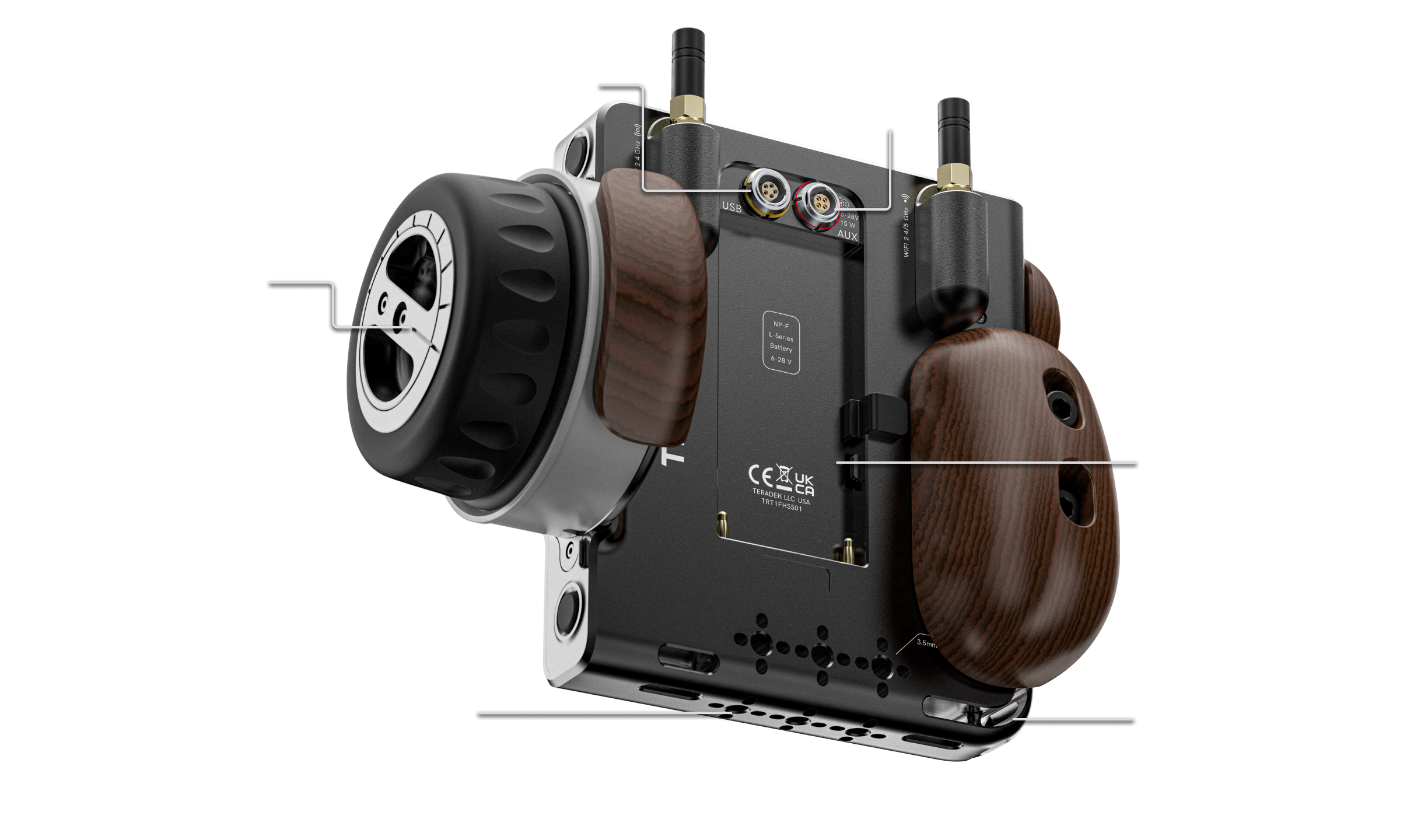
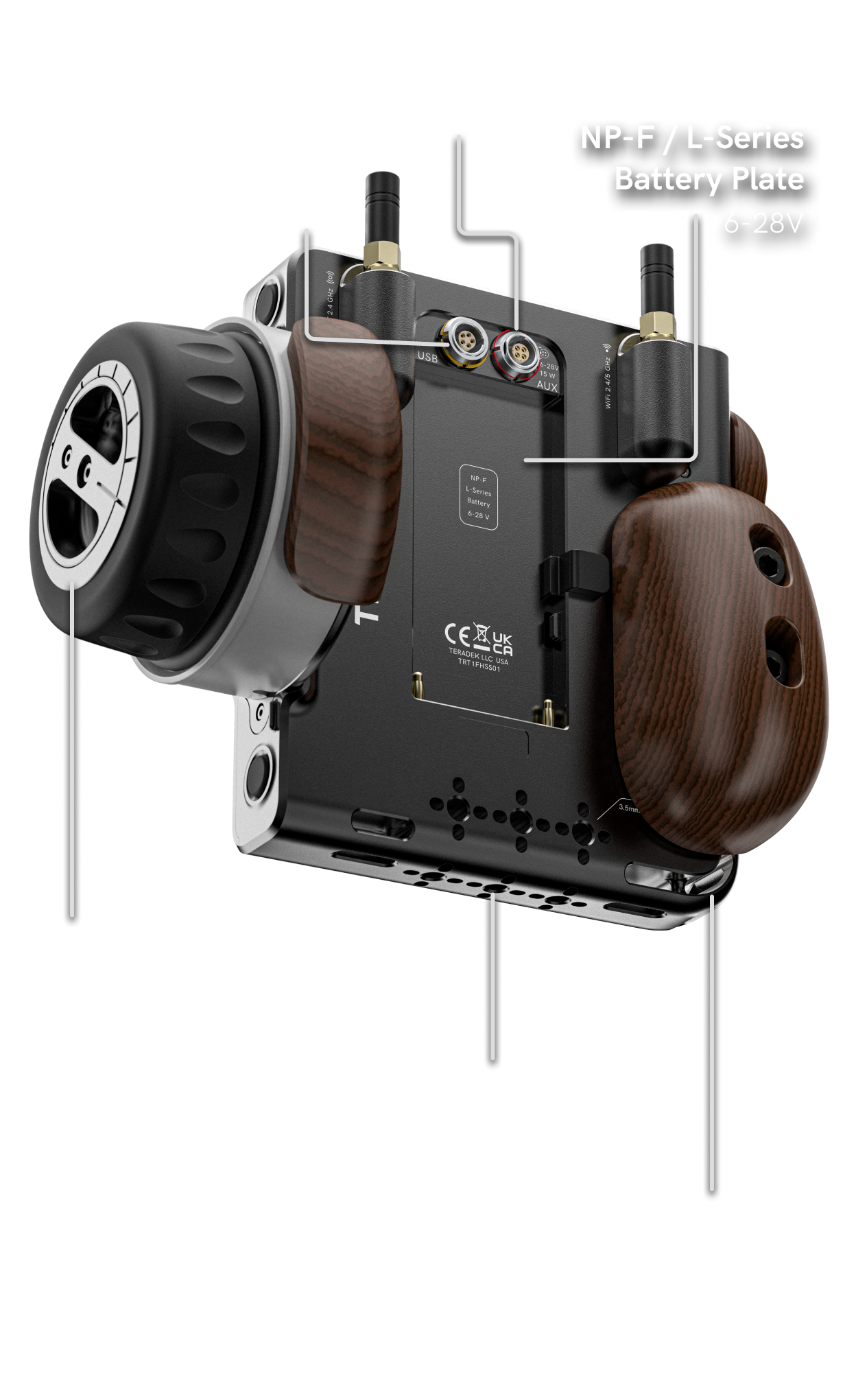
CTRL.5 Chassis Overview
CTRL.5 Chassis Overview
Hardware as Flexible
as Software
Hardware as Flexible
as Software
Hardware built to
be as flexible as
the software.
Hardware built to
be as flexible as
the software.


Personalize Your Set Up
Personalize Your Set Up
Accessorize It
Your Way
Accessorize It
Your Way
Hand Grips
Hand Grips
The three-piece lightweight Bocote wood
Hand Grip Kit consists of a Palm Grip to
hand-balance the unit, a Thumb Grip for
traction, and a Ring Guard to secure the
tightening knob.
The three-piece lightweight Bocote wood
Hand Grip Kit consists of a Palm Grip to
hand-balance the unit, a Thumb Grip for
traction, and a Ring Guard to secure the
tightening knob.
Monitor Mount
Monitor Mount
The low-profile, bolt-on monitor hinge cube
keeps the monitor close to the handset. A
hinged rosette with removable anti-twist pins
ensures a stable connection and the ability to
mount additional accessories to the cube.
The low-profile, bolt-on monitor hinge cube
keeps the monitor close to the handset. A
hinged rosette with removable anti-twist pins
ensures a stable connection and the ability to
mount additional accessories to the cube.
Lightweight Kickstand
Lightweight Kickstand
Supports your CTRL.5 at a 90º or 45º angle
on a flat surface. Mounts to the top or bottom
of the handset to provide additional ⅜”-16
and ¼”-20 mounting points.
Supports your CTRL.5 at a 90º or 45º angle
on a flat surface. Mounts to the top or bottom
of the handset to provide additional ⅜”-16
and ¼”-20 mounting points.
Colored Silicone Knob Grips
Colored Silicone Knob Grips
Color code to your camera or personalize
your controller with color knob grips. The
grips feature finger grooves around the cap
which maximize comfort.
Color code to your camera or personalize
your controller with color knob grips. The
grips feature finger grooves around the cap
which maximize comfort.
Personalize Your Set Up
Personalize Your Set Up
Accessorize It
Your Way
Accessorize It
Your Way
Precision Features
and Integrations
Precision Features
and Integrations
Get all the tools that make you bulletproof on set
without compromising quality or performance. Our
evolving
features
and third-party integrations are
developed from meticulous engineering and
extensive user feedback.
Get all the tools that make you bulletproof on set
without compromising quality or performance. Our
evolving
features
and third-party integrations are
developed from meticulous engineering and
extensive user feedback.
An Industry First
An Industry First
SmallHD Lens
Data Overlays
SmallHD Lens
Data Overlays
Teradek’s reputation for innovation and
collaboration allows us to build beyond our
own
ecosystem of products. Teradek RT,
when paired
with SmallHD monitors, can
now display an
intuitive, unobtrusive overlay
of zero-latency lens
data, including focus,
iris, and zoom marks. Keep
your eyes on the
shot without looking down at the
hand unit to
check marks.
Teradek’s reputation for innovation and
collaboration allows us to build beyond our
own
ecosystem of products. Teradek RT,
when paired
with SmallHD monitors, can
now display an
intuitive, unobtrusive overlay
of zero-latency lens
data, including focus,
iris, and zoom marks. Keep
your eyes on the
shot without looking down at the
hand unit to
check marks.
Zero-latency
Zero-latency
On-screen focus markers
On-screen focus markers
Pinch-to-zoom focus scale
Pinch-to-zoom focus scale
Axis limits
Axis limits
Shop All Teradek RT
Shop All Teradek RT
Find the perfect kit or build your own.
Find the perfect kit or build your own.
ShopLearn all about Teradek RT
Learn all about Teradek RT
Simplified For
A Faster Prep
Simplified For
A Faster Prep
CTRL.5 is the heart of an ecosystem of products that can scale to the needs of any production, giving you the power to
quickly adapt to any workflow challenge. All RT hardware is backwards
compatible allowing it to grow with you.
CTRL.5 is the heart of an ecosystem of products that can scale to the needs of any production, giving you the power to
quickly adapt to any workflow challenge. All RT hardware is backwards
compatible allowing it to grow with you.
Videos


Firmware, Workflows, and Guides
CTRL.5) have integration with SmallHD in which
Overlays can
be enabled when a connection
between the two are established
ecosystem are backwards compatible with the
only limitations being lens
mapping on the oldest
legacy hardware.
from CTRL.1/3. Lens Map Transfers requires CTRL.5 FW 2.1 or later.
CineRT, Cine Tape, and Moon Smart Focus are
supported on the MDR.X.
rangefinders.
Talk to a Product
Specialist
Talk to a Product
Specialist
Contact us for more information on how to
optimize your RT workflow.
Contact us for more information on how to
optimize your RT workflow.
- Choosing a selection results in a full page refresh.
- Opens in a new window.